The Best Music Alarm Apps for iPhone in 2026
Waking up to a beep is a rough way to start the day. The best alarm clock apps for iPhone wake you with real music instead. This guide compares how the top options stack up, including what each one costs once you're past the free-trial screens.
One more reason this page exists: most "best alarm app" roundups you'll find were written between 2016 and 2019. They still recommend apps that left the App Store years ago, and at least one popular list tells iPhone owners to install an Android-only app. Every app below is live on the US App Store as of August 2026, and every price was pulled from its current paywall this month.
All iPhone music alarm apps, as of August 2026
| App | Best for | Price | Spotify | Apple Music | Full songs, free tier? |
|---|---|---|---|---|---|
| LuxRiseOur pick Get it free | Waking to your own music | Free, no ads, no subscription | Yes | Yes | Yes |
| Alarmy | Heavy sleepers | Free tier; ~$5/mo or ~$60/yr | Paid tier | Paid tier | No |
| Alarmify | A paid alternative to LuxRise | Free tier; $9.99/mo or $49.99/yr | Yes | Yes | 30-second clips only |
| Sleep Cycle | Sleep tracking + smart wake | Free tier; ~$40/yr | No | No | Own sounds only |
| Music Alarm (Olivet) | Your own audio files | $7.99/mo or $29.99/yr | No | No | No |
| Alarmfy | Budget Spotify alarm | $3.99/mo or $28.99/yr | Yes | Yes | No |
| Apple Clock (built-in) | Zero-setup reliability | Free | No | Library songs only | Yes, for saved songs |
Prices checked August 2026 on the US App Store. Trial terms shift often, so treat these as the going rate, not gospel.
Two ways to wake up to music on an iPhone
Before the rankings, it's worth knowing what you're actually choosing between. Every music alarm app takes one of two routes, and the route decides the price.
One: a pack of audio the app already owns. You wake to the app's own library of tones, melodies and soundscapes, downloaded once and stored on your phone. It works offline and it rarely breaks. But you're picking from someone else's shortlist, not your music, and the decent packs almost always sit in the paid tier.
Two: it connects to the music you already pay for. The app signs into your Spotify or Apple Music account and streams your own song or playlist at wake-up time. This is what most people picture when they think "music alarm". It's also much harder to build, which is why nearly every app that offers it charges a subscription for it.
That second charge is the part we couldn't get past. You already pay for the music. Being billed again to hear it at 7 a.m. is a fee for nothing. So we built LuxRise the second way and made it genuinely free: no subscription, no in-app purchases, and no ads anywhere in the app. We looked for another free music alarm app doing the same thing before we started, and we still haven't found one. If you know of one, tell us and it goes on this page.
Here's what we tested.
How we tested for the best music alarm app
First, the disclosure: we make LuxRise, the app at the top of this list. We think it earns the spot. But we'd rather show you exactly why and let you check our work than ask you to take our word for it. That's why every review below includes what the app doesn't do.
The testing itself was unglamorous:
- We set real weekday alarms with each app, the kind you actually have to get up for.
- We flipped the mute switch on, turned Wi-Fi off overnight, and force-quit each app to see what still rang in the morning.
- We tapped through every paywall behind the word "free" and wrote down the real price after the trial.
- We checked which music sources each app can genuinely stream: full songs, not 30-second clips.
LuxRise Best music alarm clock app · Free
LuxRise does one thing most alarm clock apps for iPhone can't: it wakes you to any song or playlist from your own Spotify or Apple Music account, streamed live, with the volume fading in gradually instead of hitting you at full blast. It's a gradual signal instead of a shock, done with sound.
What stood out in testing:
- Full songs from Spotify and Apple Music, streamed from your own account, nothing to buy or download
- Gentle volume fade-in: the track starts near-silent and builds, easing you awake instead of startling you
- Rings no matter what: if streaming or the network fails at wake-up time, a built-in alarm sound fires instead, so the worst case is waking to the wrong audio, not oversleeping
- The falling-asleep half is covered too: 10 curated soundscape playlists (rain, piano, lofi, handpan, video game, white noise, and more) with a 15/30/60-minute sleep timer
- No ads. At all. Your first waking moment isn't a banner ad
- Genuinely free: no subscription, no in-app purchases, no fee stacked on top of the music service you already pay for
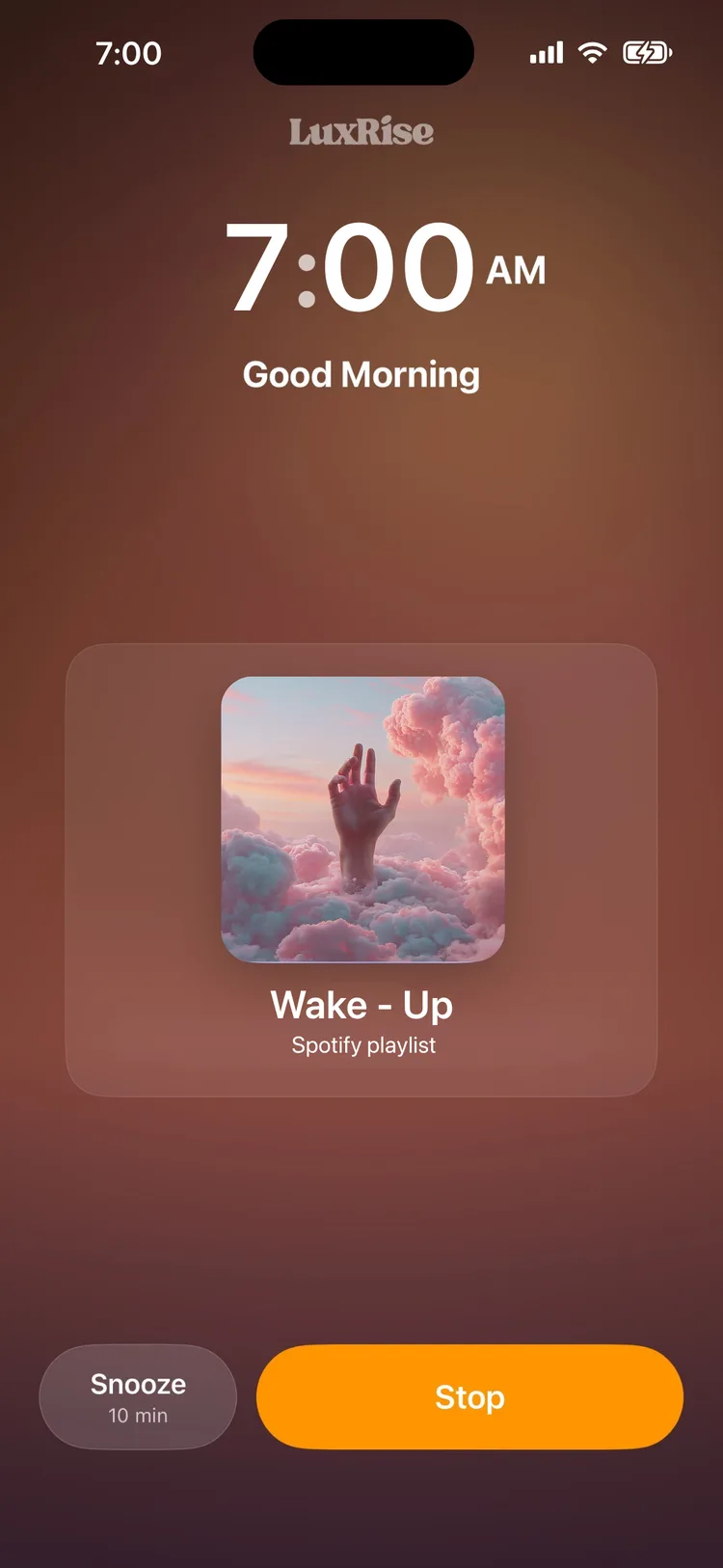
Setup takes about two minutes: connect your account, pick a song or playlist, set a time. Our LuxRise Spotify alarm guide walks through it screen by screen if you want the details before installing.
What it doesn't do. LuxRise won't track your sleep stages or record your snoring; if you want graphs, Sleep Cycle below is your pick. It's iPhone-only (iOS 18.6+), so there's nothing for the Android half of your household. It connects to Spotify and Apple Music, period. YouTube Music isn't supported. And it's newer than the big names: a 5.0-star App Store rating, but from a small handful of early reviewers rather than thousands. Current version 2.8 shipped September 9, 2026, and the app runs in 9 languages.
Get it: LuxRise: Music Alarm & Sleep on the App Store. Free.
Alarmy Best for heavy sleepers
Alarmy is the "missions" app: it won't stop ringing until you solve math problems, take 20 steps, shake the phone, or photograph a registered spot in your home. Usually that spot is the bathroom sink, because it forces you to physically walk there. If you've snoozed through every alarm you've ever owned, this is the sledgehammer, and it works.
The honest tradeoffs:
- Music wake-up sits behind the paywall. Waking to your streaming music is a premium feature, around $5/month or $60/year at last check, and that's on top of your music subscription.
- It's built around punishment, not pleasure. Missions first, music second. Effective, but nobody enjoys it.
- It's overkill for most people. If you don't chronically sleep through alarms, you're paying for a drill sergeant you don't need.
Alarmy is the right call for genuinely heavy sleepers. If the mission grind wears you down after a month (a common story), we compared the best Alarmy alternatives separately.
Alarmify Paid Spotify + Apple Music
Alarmify is the closest thing to a direct LuxRise rival: a purpose-built music alarm with Spotify and Apple Music support that's still actively updated. Credit where due: it's a solid product.
The catch is the pricing structure:
- The free version plays 30-second clips of your chosen song, not the full track.
- Full songs (branded "Smart Wake") require Alarmify+ at $9.99/month or $49.99/year.
- That fee sits on top of the music subscription you already have, so it's two payments to wake up to one song.
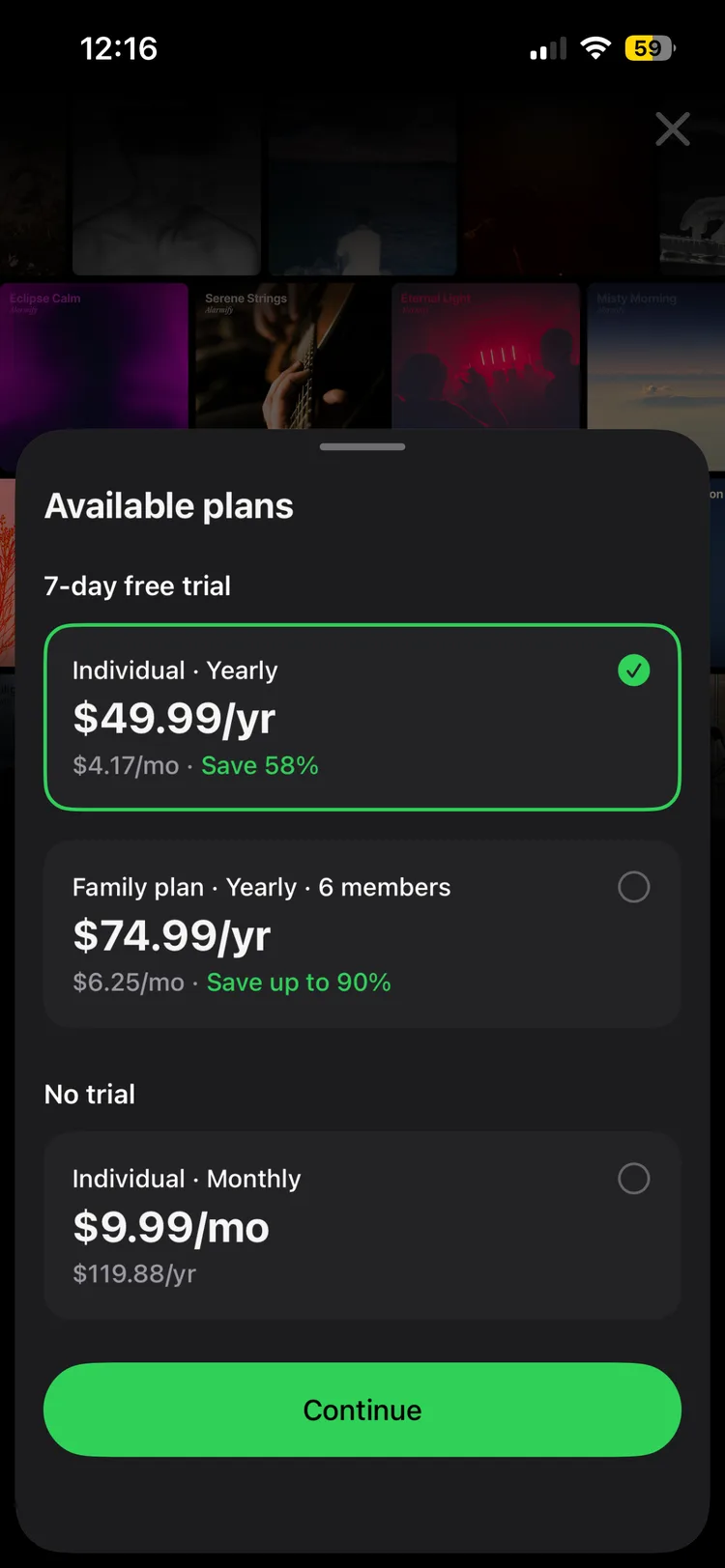
If you'd rather not do that math at 6 a.m., the feature you're paying for (full songs from your own streaming account, with a fade-in) is what LuxRise does for free.
Sleep Cycle Sleep tracking + smart wake
Sleep Cycle is a different animal: it's a sleep tracker first and an alarm second. It listens to your movement and sound overnight, charts your sleep stages, and fires the alarm during a light-sleep window near your target time; the pitch is that waking from light sleep leaves you less groggy. If sleep analysis is what you're after, it's the most polished option on this list, and none of the music-first apps here, ours included, can replace it.
Know what you're buying, though:
- The alarm plays Sleep Cycle's own tones and melodies. There's no Spotify or Apple Music wake-up.
- Most of the useful features (long-term trends, snore detection, smart-alarm customization) sit in the premium tier, around $40/year.
- The smart wake window means your alarm can fire before the time you set, by design. Some people love it; some find it unsettling.
Plenty of people run Sleep Cycle for the data and a music alarm for the actual waking. The two jobs don't overlap as much as the app stores suggest.
Music Alarm (Olivet) Your own audio files
Music Alarm by Olivet takes the old-school route: it plays audio files you own and import yourself. If you have a folder of MP3s from 2009, it will happily wake you with them.
- No Spotify, no Apple Music streaming. Your own files only, which rules out most people's actual music library in 2026.
- Premium runs $7.99/month or $29.99/year. A real subscription for a feature set the built-in Clock app mostly covers for free.
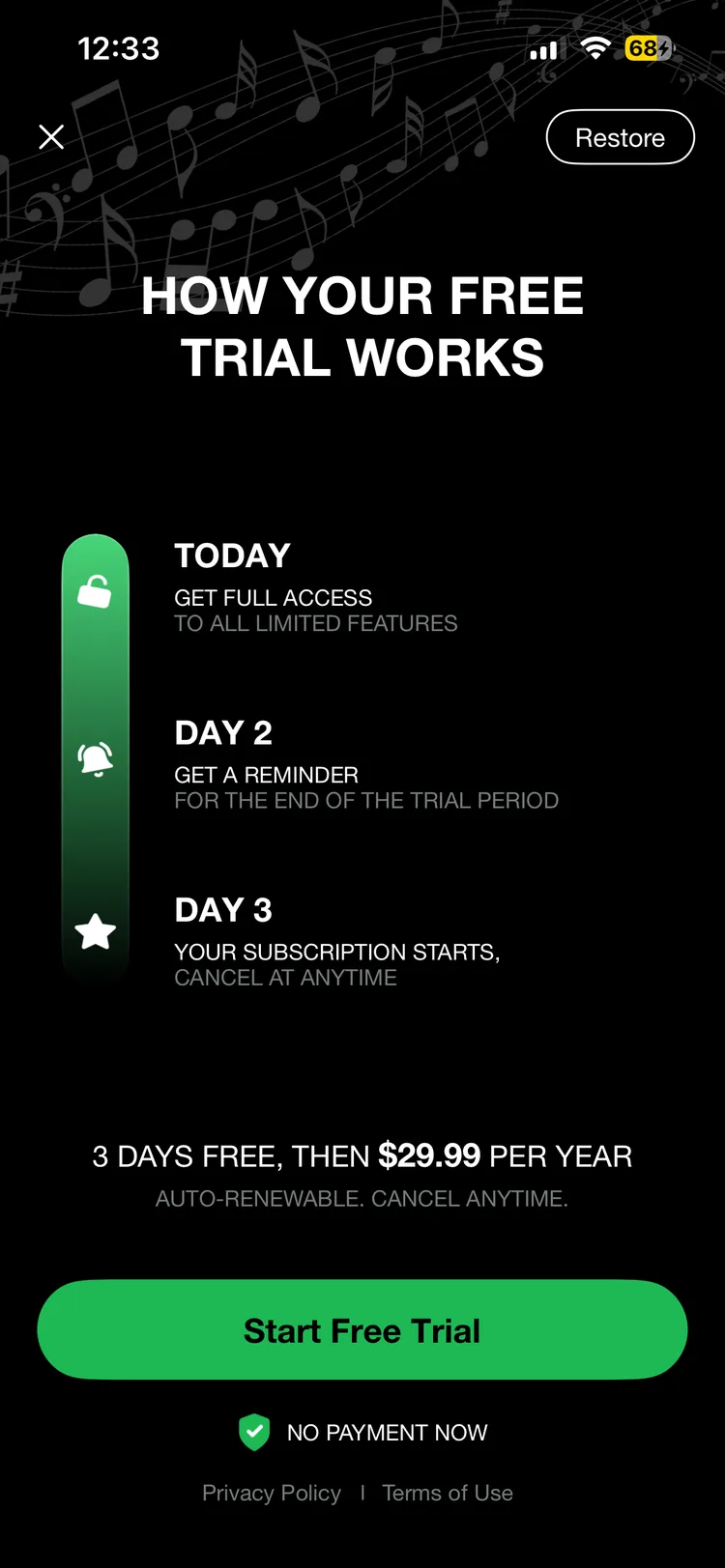
Hard to recommend unless your music genuinely lives in files rather than a streaming account.
Alarmfy Budget Spotify alarm
Alarmfy (not to be confused with Alarmify above; this category has a naming problem) is the cheaper way into Spotify alarms:
- Supports both Spotify and Apple Music, and the integration works as advertised.
- Charges its own subscription, $3.99/month or $28.99/year, on top of the music service you already pay for.
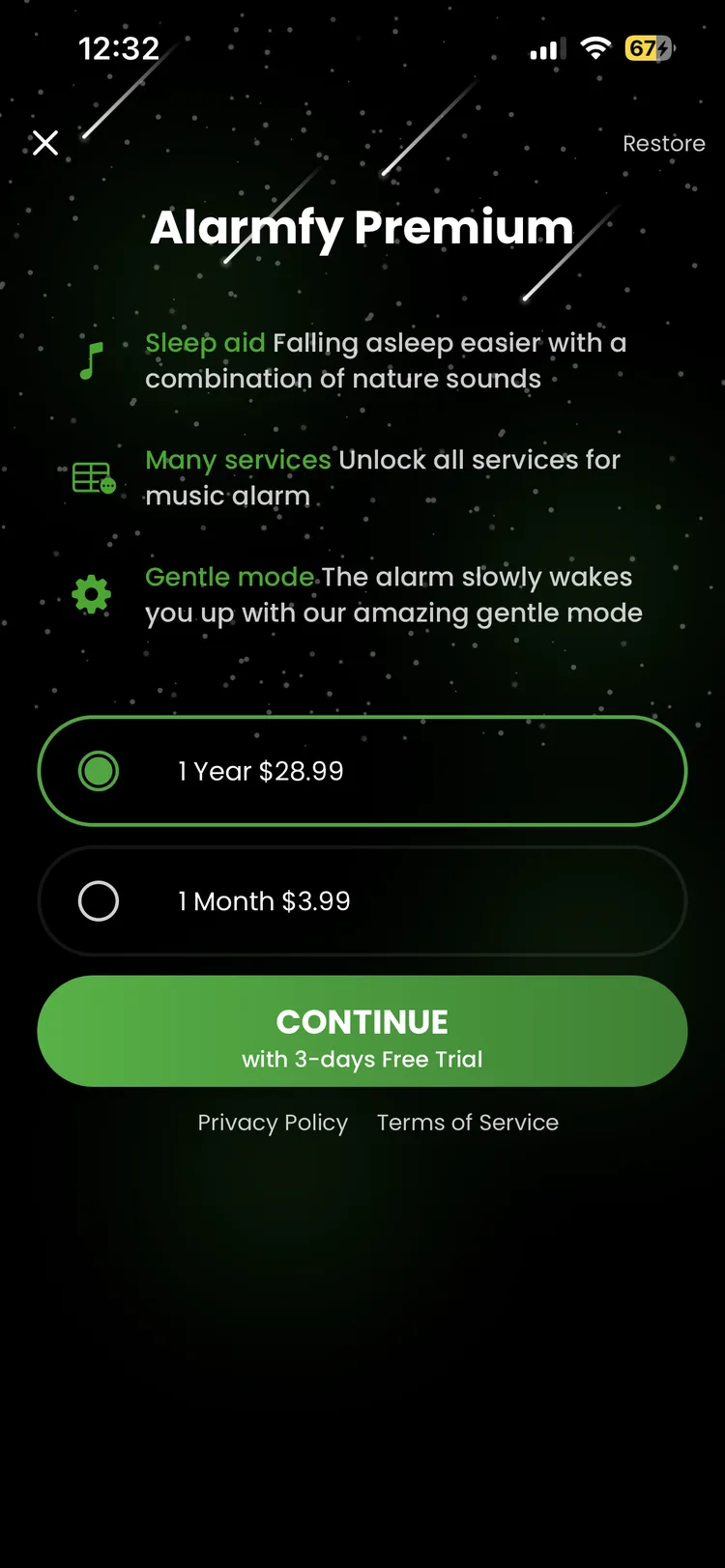
At roughly $29/year it undercuts Alarmify, but it's still a recurring fee for something available free elsewhere. Same math, smaller number.
Which of these get you to sleep, not just up?
Alarm roundups stop at the morning, and that misses half the problem. Most people hunting for a music alarm also want something playing while they fall asleep, and they want it to stop on its own instead of running until 3 a.m. That's a sleep timer, and it's the feature people most often assume an alarm app already has. Most don't.
- LuxRise covers both ends of the night: 10 curated soundscape playlists (rain, piano, lofi, handpan, video game, white noise and more) with a 15, 30 or 60 minute sleep timer that fades out and shuts off by itself. Both halves sit in the free tier, with nothing to upgrade.
- Sleep Cycle has the deepest sleep-side library here, with sounds, stories and guided sessions. Nearly all of it lives behind the roughly $40/year premium tier.
- Alarmy bundles bedtime sounds alongside the missions, also on the paid tier.
- The built-in Clock app can fake it, and this trick is worth knowing: open the Timer tab, set a duration, then change When Timer Ends to Stop Playing. Whatever's playing, Spotify included, cuts out when the timer runs down. Free, but you set it by hand every night and there's no fade.
- Alarmify, Alarmfy and Music Alarm are alarm-first. We didn't find a sleep-sound library or a sleep timer in any of the three.
It's a fair tiebreaker if two apps otherwise look the same to you. Waking up well and falling asleep well are the same problem viewed from opposite ends, and paying two apps to solve one of them each is how most people end up here in the first place.
Can the built-in Clock app play music instead?
For pure reliability, nothing beats it. The system alarm is the one alarm iOS will always fire, and it can wake you with music, within limits. Open an alarm, tap Sound, then Pick a song, and anything saved in your Music library is fair game.
The limits are three:
- No Spotify. The picker only sees your local Music library. Spotify tracks don't live there and never will.
- No playlists. One song per alarm.
- No fade-in. Your track detonates at whatever volume your alarm is set to.
There's also a well-known Apple Music alarm trap: choose an Apple Music song that isn't downloaded to your phone, and the alarm can quietly revert to a default tone. Apple's own support forums are full of confused posts about it. If you want to go the built-in route anyway, our guide to set any song as your alarm covers every step, plus the fixes for when the Clock app plays a beep instead of your track.
Why most alarm apps can't play Spotify
Blame plumbing, not laziness. Apple's Clock app pulls alarm sounds from the local Music library. Spotify tracks aren't files sitting on your phone that any app can grab. They're streams gated behind Spotify's own developer kit, with licensing rules attached. An alarm app that wants to wake you with Spotify has to integrate that kit properly, keep your login fresh, and start playback from a backgrounded app at 6 a.m., unattended.
Most alarm apps never do that work. The workarounds you'll find instead (Siri Shortcuts automations that fail silently if one toggle is wrong, or paid "MP3 converter" tools that strip copy protection) are fragile at best and legally gray at worst. The honest options in 2026 are the few apps that built the real integration: on this list, LuxRise did it free, and Alarmy, Alarmify, and Alarmfy charge for it. Almost nothing else on the App Store qualifies.
Will a third-party alarm actually ring at 6 a.m.?
Read any Reddit thread about alarm apps for iPhone and the top reply is never about features. It's the fear: "but will it actually go off?" Fair question. A music alarm has more failure points than a beep: the app has to wake from the background, reach the network, authenticate with your streaming service, and start playback, all while you're asleep.
Four things can break, and this is what separates the serious apps from the rest:
- iOS killing the app overnight. Well-built alarm apps are engineered around this; badly built ones just don't ring.
- The mute switch and Focus modes. Media-channel audio usually plays through both, but only if the app keeps its permissions.
- The network being down. This is the big one for streaming alarms, and the reason a built-in fallback sound is non-negotiable. LuxRise's design rule is that the alarm rings no matter what: if Spotify or Apple Music can't start, a local sound fires instead.
- A streaming session conflict: your account playing on another device at the wrong moment.
The picture is improving across the board: with iOS 26, Apple began giving third-party alarm apps system-level alarm support, closing much of the old reliability gap. Even so, trust nothing until you've tested it. Set an alarm two minutes out, flip the mute switch, turn off Wi-Fi, close the app, and see what happens. Two minutes of paranoia buys you months of sleep. And if even your stock alarms have been failing lately, that's usually a settings issue; we wrote up the fixes for an iPhone alarm not going off separately.
The bottom line
Every paid app on this list stacks its own fee on top of the music service you already pay for. LuxRise doesn't: full songs from your own Spotify or Apple Music, a fade-in that starts your day gently, and a fallback sound that makes sure the day starts at all. Free, with no ads and nothing to upgrade. Set tomorrow's alarm to a song you actually want to hear.
Download LuxRise Free on the App StoreFAQ
What is the best alarm app for iPhone?
It depends on what wakes you. For waking up to your own music, LuxRise is the strongest pick in 2026: it streams full songs from Spotify or Apple Music, fades the volume in gradually, and is completely free. If you sleep through everything, Alarmy's dismissal missions are more effective. If you want sleep analysis alongside your alarm, Sleep Cycle is the one to try.
What is the best free alarm app for iPhone?
LuxRise. It's free with no ads, no subscription, and no in-app purchases, and the free version isn't a teaser: full songs, playlists, the volume fade-in, and the sleep soundscapes are all included. Apple's built-in Clock app is also free and extremely reliable, but it can only play songs saved in your Music library.
Can you set an alarm with music on an iPhone?
Yes, two ways. The built-in Clock app can use any song saved to your Music library: edit an alarm, tap Sound, then Pick a song. For anything it can't reach (Spotify, full playlists, a gradual volume fade) you'll need a music alarm app like LuxRise, which streams the song from your own account at wake-up time.
Do music alarm apps need Spotify Premium?
Some do. The more common cost is the app's own subscription, charged on top of the music service you already pay for, which means two bills to wake up to one song. LuxRise adds no second fee. Read the fine print before committing, and whatever you pick, make sure it has an offline fallback sound so a dropped connection can't silence your morning.
Which alarm app is best for heavy sleepers?
Alarmy is built for exactly this: it won't stop ringing until you solve a math problem, take 20 steps, or photograph a spot in your home. It's abrasive by design, and it works. If missions feel like punishment, try the opposite approach first: a song you love with a fade-in that ends at full volume is surprisingly hard to sleep through.
Will a third-party alarm still ring on Silent mode or Do Not Disturb?
Usually, yes. Well-built alarm apps play sound through the media channel, which the mute switch and most Focus modes don't control, and iOS 26 added system-level alarm support for third-party apps. But it depends on the app keeping its permissions, so test before you trust: set an alarm two minutes out, flip the mute switch, lock the phone, and see what happens.
What is the gentlest iPhone alarm to wake up to?
A song you actually like, starting quiet and building slowly. Instead of a full-volume jolt, LuxRise begins your chosen track near-silent and raises the volume gradually, so you surface from sleep rather than get yanked out of it.
Why can't I pick a song for my alarm on my iPhone?
The Clock app can only offer songs saved in your Music library. If a track lives on Spotify, or you haven't added it from Apple Music, it won't appear in the picker. Adding the song to your library (and downloading it) fixes the Apple Music case. For Spotify there's no native option; a music alarm app is the only route that works.
Is there a version of Sleep as Android for iPhone?
No, and there never has been. Sleep as Android is Android-only, which doesn't stop it topping iPhone-focused "best alarm app" lists written by people who didn't check. The same trap catches Google Clock's Spotify alarm: a real feature, Android only, with no iPhone equivalent from Google or Spotify. On iPhone, a dedicated music alarm app is the closest replacement.